
- in Production by Bobby Owsinski
New Music Gear Monday: Audioissues Threepeat Triple Delay Plugin
Like many mixers, I like to start my mix with three delays already set up: short, medium and long. I find this combination provides exactly what I need for almost any situation very quickly, from adding a little depth, to some glue, to a longer “throw” effect. If the setup is baked into a template then setup is not a problem, but it does take a little time and thought to set up from scratch. The good news is that the new Threepeat from Audioissues features three delays in a short, medium, and long configuration, plus a few useful add-on features, to make this setup a snap.
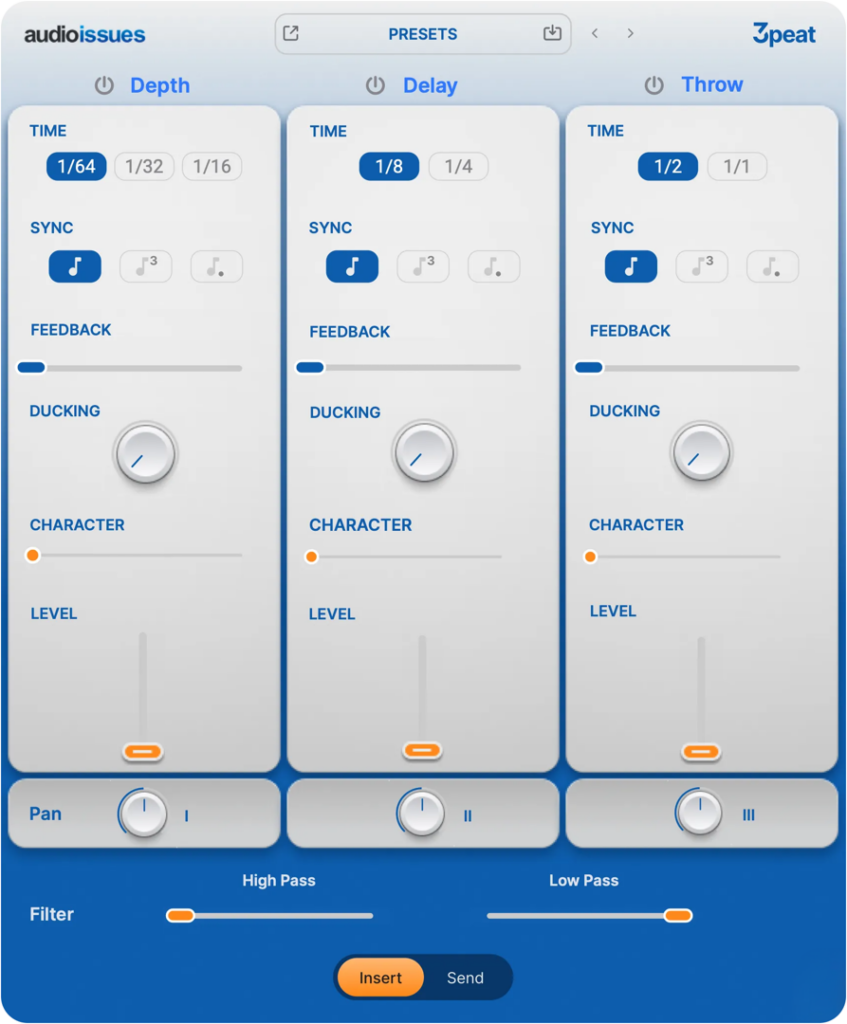
Three Delays
The layout for each of Threepeat’s delays are almost the same. At the top of each delay you can select a Time that’s synced to the tempo of the track, and below that is the ability to select note denominations (including triplet and dotted versions). Then there’s a Feedback control, a Ducking control that adjusts the level of the delay when the source signal is present, a Character control to add a bit of saturation, then Level and Pan controls.
At the bottom of the plug there are global High Pass and Low Pass filters, plus a selector for using it as an insert, or on an effects return.
The difference between each of the delays is the Time selector. On the first Depth delay, you can select between 1/64th, 1/32nd, and 1/16th notes. The middle Delay module selects between an 1/8th or 1/16th note, and the third Throw module between half and whole note delays.
All About Convenience
While many engineers will still appreciate the versatility that the traditional three separate delay setup brings, you can’t argue with the fact that having ducking and character controls sure reduces setup time.
Threepeat is just $49 and has a free 15 day trial period. It also works on both Mac and PC and in all plugin formats, which means that it will operate in almost any DAW environment.
You can find out more here, or watch the video below.
