
- in Production by Bobby Owsinski
New Music Gear Monday: Mastering the Mix STEREOVAULT Stereo Width Plugin
Getting the stereo width right on a mix or master is one of those things that sounds simple until you’re actually doing it. Go too narrow and the track sounds flat and lifeless. Go too wide and you end up with phase problems, a hollowed-out center, and a mix that falls apart on mono playback. Most of the time, engineers are making that call by ear alone, with no real guide telling them whether the width they’ve chosen is actually working for the material. That’s the problem that the new STEREOVAULT from Mastering the Mix is designed to solve.
[INSERT STEREOVAULT PRODUCT IMAGE HERE — save image locally from https://www.masteringthemix.com/products/stereovault and upload to WordPress]
Analyze First, Then Shape
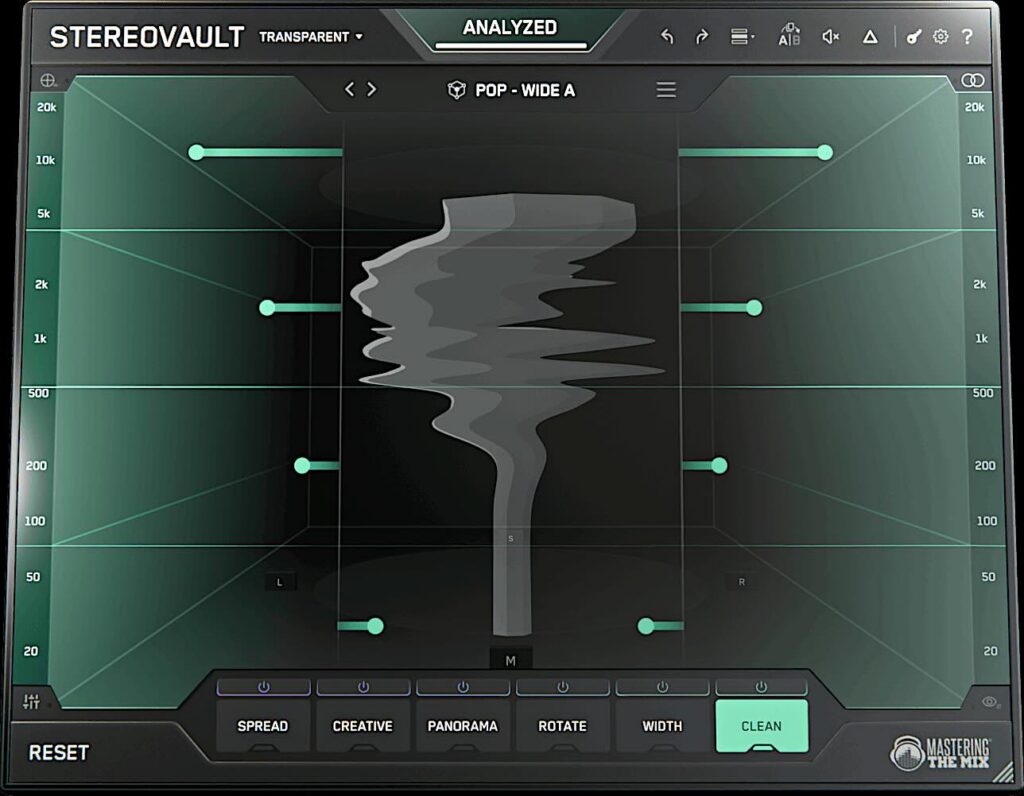
The concept behind STEREOVAULT is smart. Rather than just handing you a width knob and wishing you luck, it starts by analyzing your audio and suggesting an appropriate stereo width based on the source material.
You select the source type, hit analyze, and the plugin gives you a recommended starting point that’s actually grounded in what’s coming through the channel. From there, you take over with a set of shaping tools that cover just about every angle of stereo control you’d want.
The Controls
STEREOVAULT gives you six controls to work with: Spread, Creative, Panorama, Width, Rotate, and Clean, which is a pretty comprehensive toolkit for a stereo imaging plugin.
Spread and Width handle the obvious width-related adjustments, while Creative adds some extra dimensionality to the image.
Panorama lets you place the image in the field, and Rotate shifts the balance between left and right without throwing off mono compatibility.
Clean is the one that really stands out, as it’s there to dial out any unwanted stereo artifacts that might be creeping in, which is exactly the kind of thing that causes problems when your mix gets played on a phone or a mono Bluetooth speaker.
Level-Matching For Honest Decisions
One of the things Mastering the Mix has consistently built into their plugins is loudness matching on every move, and STEREOVAULT is no different.
Every adjustment you make is level-matched, so you’re not fooling yourself into thinking something sounds better just because it got louder when you widened it.
That’s a subtle but important detail that makes a real difference in how much you can trust what you’re hearing.
Where It Works
STEREOVAULT can go on individual channels, buses, or your master. Whether you’re trying to give a stereo guitar bus a bit more space, tighten up the low end of the field on a master, or find the right overall image for a full mix, it’s a processor that’s worth checking out.
It’s available in VST, VST3, AU, and AAX formats for both Mac and PC.
STEREOVAULT is priced at $79 from the Mastering the Mix website, and a free trial is available. Check out the video below for more details.
